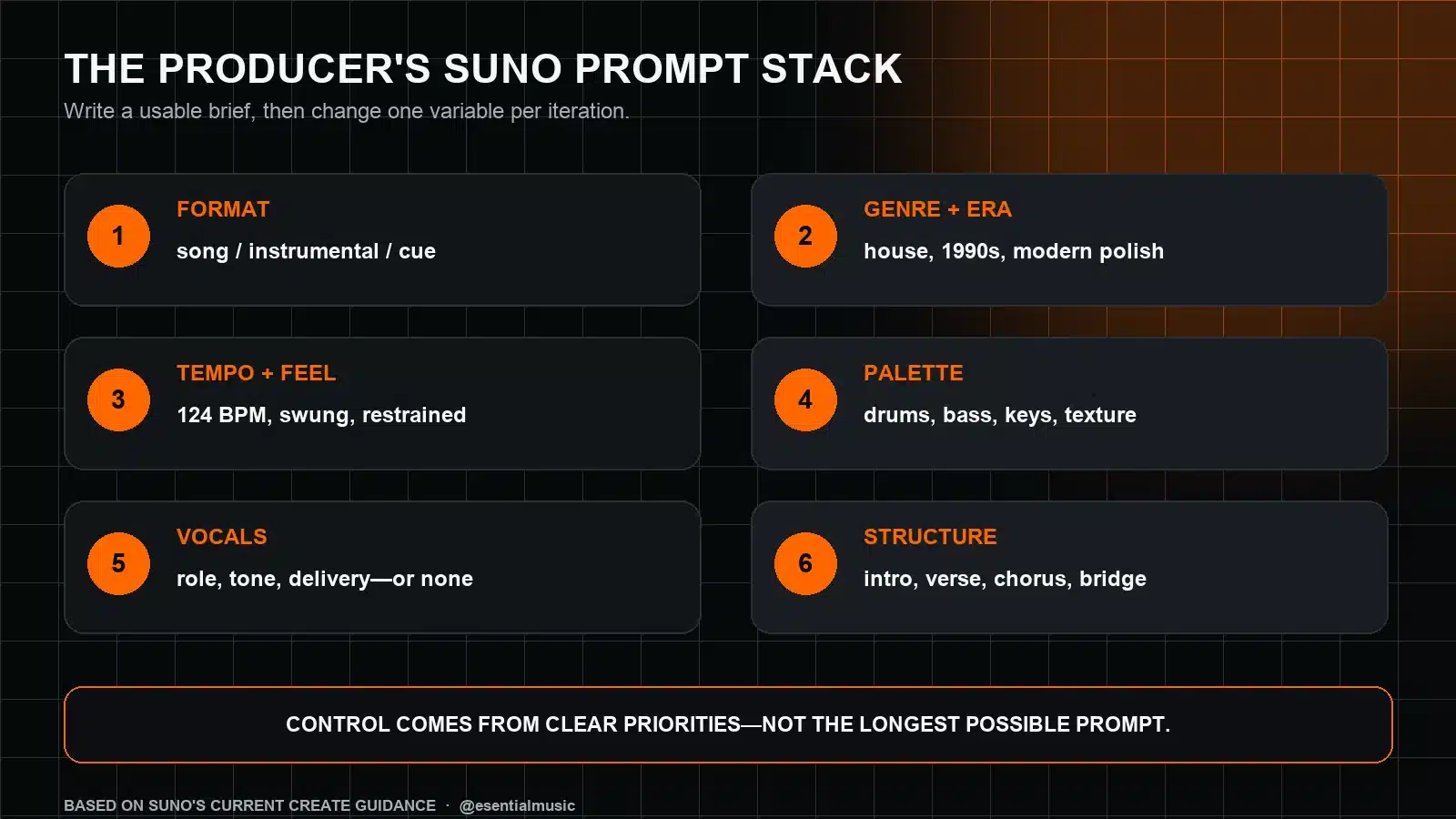
A better Suno prompt is not simply a longer prompt. It is a clear production brief: the type of piece, musical direction, tempo and feel, core palette, vocal role and structure—ranked so the most important idea survives the generation.
What Suno Needs From a Music Producer
Suno’s current Create guidance encourages specific descriptions of genre, mood, instrumentation, tempo and vocals. In its more detailed mode, lyrics and style can be handled separately, while structure labels such as [Verse], [Chorus] and [Bridge] can clarify the intended form.
The producer’s advantage is knowing which details matter. “Emotional electronic song” contains a mood and a broad family, but it leaves tempo, groove, palette, vocal function and arrangement open. That freedom may be useful for discovery; it is inefficient when you already know the job the track must perform.
The Six-Part Suno Prompt Framework
1. Define the format before the style
State whether you want a full song, instrumental, short cue, loopable idea or songwriting demo. Format changes the job of every later detail. An instrumental for a product video needs a different arrangement from a vocal single, even if both use the same genre vocabulary.
2. Use one primary genre and a controlled secondary influence
Lead with the dominant identity. Add a second influence only when you can explain its role: rhythmic language, instrumentation, harmony or production era. A pile of unrelated genres asks the model to decide what matters.
3. Describe tempo and groove as musical behaviour
BPM is useful when the tempo is part of the target, but feel is often more informative. Add language such as straight, swung, syncopated, half-time, driving or laid-back. If the exact key is not essential, avoid overloading the prompt with theory details that do not change your production decision.
4. Choose a small defining palette
Name the instruments that listeners should notice: tight electronic drums, rolling sub bass, muted electric piano, short synth pluck and a wide pad. A concise palette is easier to evaluate than a list of every layer that could possibly appear.
5. Give vocals a role, not just an adjective
Specify whether vocals are absent, lead the song, provide a hook or act as texture. Then add delivery: intimate, powerful, conversational, airy, rhythmic or restrained. If you supply your own lyrics, keep the style description focused on performance and production instead of repeating the lyric narrative.
6. Describe the structural arc
Use only the sections the idea needs. Suno’s official guidance supports structure tags, but tags are clearest when paired with a purpose: a sparse verse, a lift in the pre-chorus, a hook-led chorus and a short breakdown before the final chorus.
Three Complete Suno Prompt Examples
These examples demonstrate the framework. They are starting briefs, not guaranteed recipes: generative output varies, so evaluate the result and iterate.
How to Iterate Without Losing the Good Parts
Suno currently returns alternatives from a creation, which makes comparison part of the workflow. Treat the first result as evidence, not a verdict.
- Name the success. Was the groove, vocal tone, hook or palette useful?
- Name the largest mismatch. Pick one: tempo, density, structure, instrumentation or mood.
- Change one variable. Keep the successful constraints stable.
- Generate and compare. Listen for whether the change solved the named problem.
- Save the winning language. Build a reusable vocabulary from prompts that produced identifiable improvements.
If version A has the right drums but the chorus is too dense, do not rewrite the entire prompt. Preserve the drum and palette language, then ask for a sparser chorus with fewer simultaneous layers. Controlled changes teach you more than random rewrites.
Common Suno Prompt Mistakes
Writing a bag of adjectives
“Epic, emotional, huge, professional, catchy” gives no arrangement mechanism. Convert adjectives into musical decisions: wider harmony in the chorus, a quieter verse, a short riser or a dry vocal before the final lift.
Contradicting the hierarchy
A prompt that asks for minimal production, maximal orchestration, intimate vocals and festival-scale impact offers no clear priority. Decide where the contrast occurs instead: intimate verse, expanded chorus.
Micromanaging every second
Too many exact instructions can make the brief brittle. Specify the musical identity and the few moments that define success, then leave room for a coherent performance.
Changing everything after one generation
When every iteration uses different genre, tempo, palette and structure, you cannot tell which wording helped. Change one major variable at a time.
Treating artist names as a substitute for description
Describe observable musical features—tempo, instrument roles, vocal delivery, groove, harmony and era—instead of relying on a named artist to carry the entire request. This produces a clearer creative brief and a more original direction.
Simple Mode or Advanced/Custom Mode?
Use the simplest mode when you want fast discovery and are comfortable with the model making broad decisions. Move to the more detailed mode when lyrics, vocal treatment, instrumentation or song structure must be separated and reviewed deliberately. Suno’s interface changes over time, so follow the labels shown in your current Create workspace rather than an old screenshot.
For a broader overview of where generative tools fit in production, see EMP’s guide to the best AI tools for music production.

Build a repeatable prompt library
Suno Prompt Blueprint
If you prefer starting from tested directions instead of a blank box, Suno Prompt Blueprint currently includes 2,500 copy-ready prompts across four prompt libraries, plus a 20-minute Quick Start Masterclass. Adapt the prompts with the framework above so they serve your song rather than replacing your judgment.
A Final Prompt Checklist
- Is the format clear?
- Does one genre lead the musical identity?
- Are tempo and groove described when they matter?
- Is the instrument palette focused?
- Do vocals have a defined role and delivery?
- Does the structure explain the arc rather than list every possible section?
- Can you identify one variable to change after listening?
A strong prompt makes the next production decision easier. Write the brief, generate alternatives, diagnose one mismatch and iterate with intent.
Primary sources: Suno: How to Make a Song (updated August 12, 2026); Suno Help: Simple Mode; Suno’s beat-making guide. Features and plan access can change; verify the current Suno interface and terms before relying on subscription-specific options.