A convincing tech house bassline is usually simple on paper and precise in context. The groove comes from where the notes stop, how they answer the kick and what changes in the second bar—not from filling every available sixteenth note.
What Makes a Tech House Bassline Groove?
Tech house often relies on a stable four-on-the-floor kick and a syncopated bass phrase. The kick establishes the grid; the bass creates movement around it. If both sounds sustain through the same moments, the low end becomes crowded. If the bass pattern is too sparse or random, the track loses forward motion.
The useful target is controlled interruption: the listener learns the pattern quickly, but rests and one or two deviations stop it from feeling mechanical. Groove is therefore a relationship between rhythm, note length, dynamics and the kick—not a specific preset.
Step 1: Build the Kick and Bass in One Two-Bar Loop
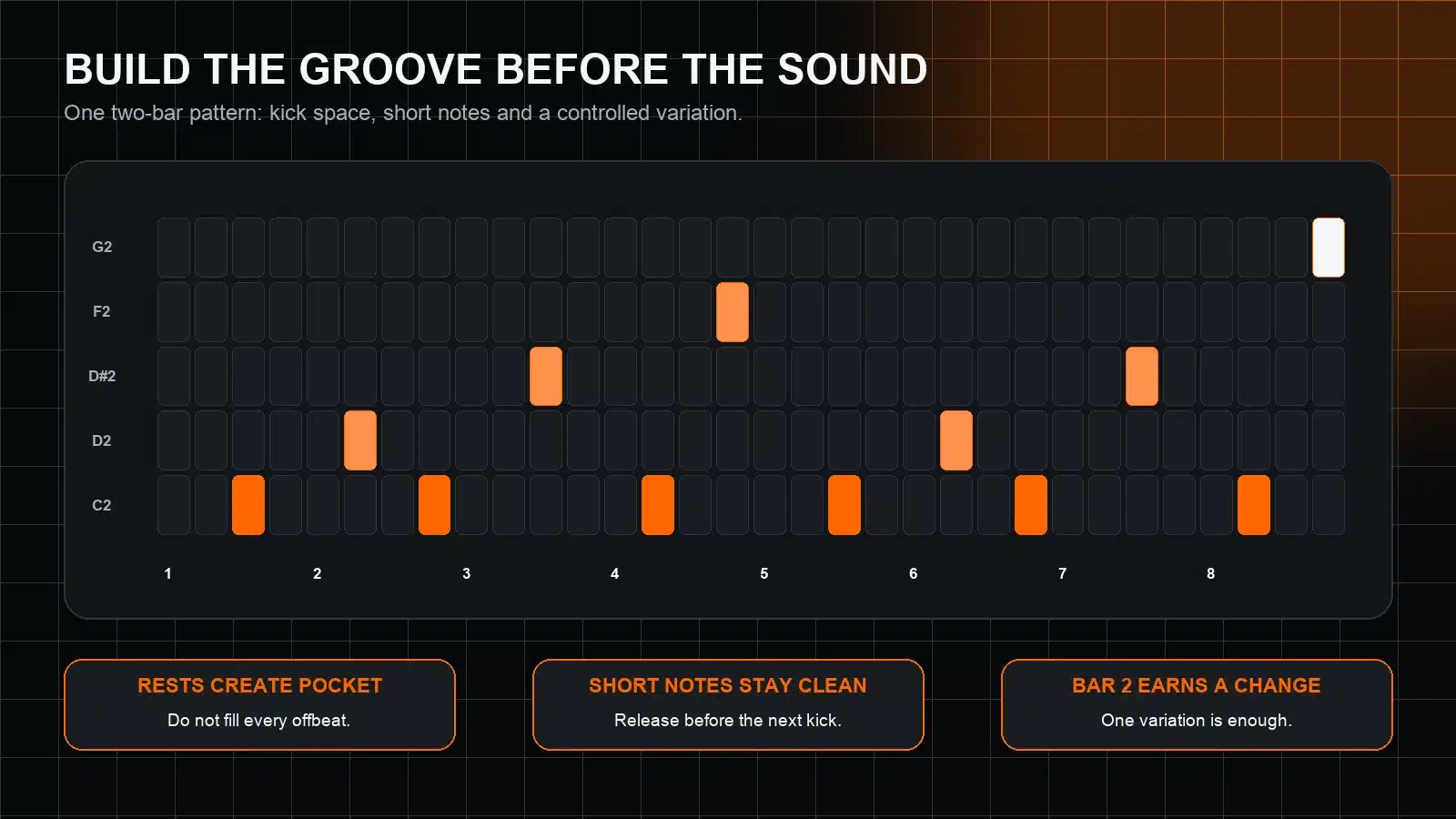
Start with eight kick hits across two bars. Add the bass on a separate MIDI track, but audition both together from the beginning. A two-bar window is long enough to create a call-and-response pattern while still exposing weak timing.
Use a simple sound: one oscillator, a short amp envelope and little or no reverb. A spectacular preset can hide a poor rhythm with movement, stereo width or effects. A plain patch makes the groove accountable.
Step 2: Place Notes in the Gaps, Then Remove One
Begin with notes after selected kick hits rather than directly on every downbeat. The classic offbeat is a useful starting point, but a bassline made only of identical offbeats can feel generic. Move one event earlier or later by a sixteenth, then listen to how it pulls into the next kick.
Next, delete one note. The missing event often creates more groove than an added fill because it gives the kick a moment of authority. If removing a note makes the loop feel less busy but more inevitable, keep the space.
Use the “tap before pitch” test
Mute the bass instrument and tap the MIDI rhythm on one key. If the phrase still feels like a bassline against the kick, the timing is doing useful work. If it only becomes interesting when the notes jump around, simplify the pitches and repair the rhythm first.
Step 3: Set Note Length Before Sidechain
Long notes can overlap the next kick even when their MIDI blocks look harmless, because the instrument’s release stage continues after note-off. Shorten both the MIDI note and the amp release until each event leaves a clean pocket. Then lengthen deliberately if the groove needs more weight.
Sidechain compression is helpful for shaping motion, but it should not be the first repair. If kick and bass remain crowded when the compressor is bypassed, refine the arrangement, envelope or sound choice. Ducking works best when it enhances an already intelligible relationship.
| Symptom | Likely cause | First move |
|---|---|---|
| Every hit feels heavy | Bass overlaps each kick or sustains too long | Shorten note and release before increasing sidechain |
| The loop sounds stiff | Every note has identical timing and velocity | Shift one supporting event or vary its velocity subtly |
| The groove loses impact in mono | Low layer relies on stereo widening or unstable unison | Use a more stable, centred foundation |
| The bassline feels random | Too many pitches or fills compete with the rhythmic identity | Return to one root note and one two-bar variation |
Step 4: Make Pitch Serve the Rhythm
A single root note can carry an effective tech house groove. Add another pitch only when it has a job: leading back to the root, answering the vocal or marking the end of the phrase. Octave jumps create contrast without changing harmony; short chromatic approaches can add tension, but they should resolve clearly.
Keep the sub region stable. If a higher note loses low-end weight, that may be useful for a fill, but avoid compensating with automation that makes the next root hit oversized. Judge the sequence at a consistent monitoring level.
Step 5: Choose a Sound With the Right Envelope
Listen for the bassline’s job in the arrangement. A short, rounded sound leaves space for percussion and vocals. A more sustained or distorted patch can carry a sparse drop, but it requires stricter control of release and low-frequency content.
A practical two-layer design uses a stable mono foundation for the lowest octave and a quieter mid-bass texture above it. Give each layer a distinct role. The same principle appears in EMP’s guide to layering synths without mud: role, register and envelope come before corrective processing.
Filter movement should follow the phrase
Use envelope or automation movement to emphasise the rhythm, not to rescue it. A slightly brighter last note can announce the loop boundary. A slowly opening filter can build a section. If every note has a dramatically different tone, the bassline may stop feeling like one instrument.
Step 6: Add Swing Without Losing the Anchor
Apply swing to the percussion and bass events that share the same subdivision, then compare the result with the kick and clap. Do not move every note equally. The four-on-the-floor anchor usually remains straight while selected sixteenths lean later.
Start with a small amount and level-match the comparison. If the groove feels delayed rather than relaxed, reduce the swing or return a key bass note to the grid. Manual timing edits can be more musical than a global groove setting because they let you protect the phrase’s strongest accents.
Step 7: Turn the Loop Into an Arrangement
A two-bar phrase should not play unchanged for the entire track. Build variations by subtracting first. Remove the final note before a transition, shorten the pattern under a vocal, mute the bass for one kick, or open the filter gradually into the drop.
Create three versions:
- Core: the complete two-bar identity.
- Reduced: fewer notes for intros, breakdown exits or vocal space.
- Lift: one extra pickup, octave event or brighter articulation for a section boundary.
These variations preserve recognition while changing energy. They are usually more effective than writing a new bassline every eight bars.

A practical starting library
Techno House Bundle
If you want material to reshape rather than another finished loop to copy, the EMP Techno House Bundle brings together editable bass MIDI, genre-focused presets for Serum, Spire and Vital, plus drum and loop resources. Use the rhythm method above to rewrite the MIDI around your own kick and arrangement. The named synth plugins are required for their respective preset formats and are not included.
Final Tech House Bassline Checklist
- Does the rhythm work with a plain sound?
- Are there deliberate gaps around the kick?
- Do MIDI length and amp release agree?
- Is one rhythmic cell easy to recognise?
- Does bar two change only what it needs?
- Is the lowest layer stable and centred?
- Does swing improve the pocket rather than delay it?
- Do reduced and lift variations support the arrangement?
A groovy tech house bassline is not a density contest. Build the pocket, make each note earn its place and let the arrangement reveal the pattern in stages.
Sources: Ableton Live Manual: Editing MIDI; MusicRadar: how to create a tech house groove. The workflow is DAW-neutral; menu names and groove controls vary by application.