EMP / Mixing fundamentals
Your reverb sounds spacious in solo, but the lead loses its attack when the track plays. You shorten the tail until the space disappears. The problem may not have been the tail length at all.
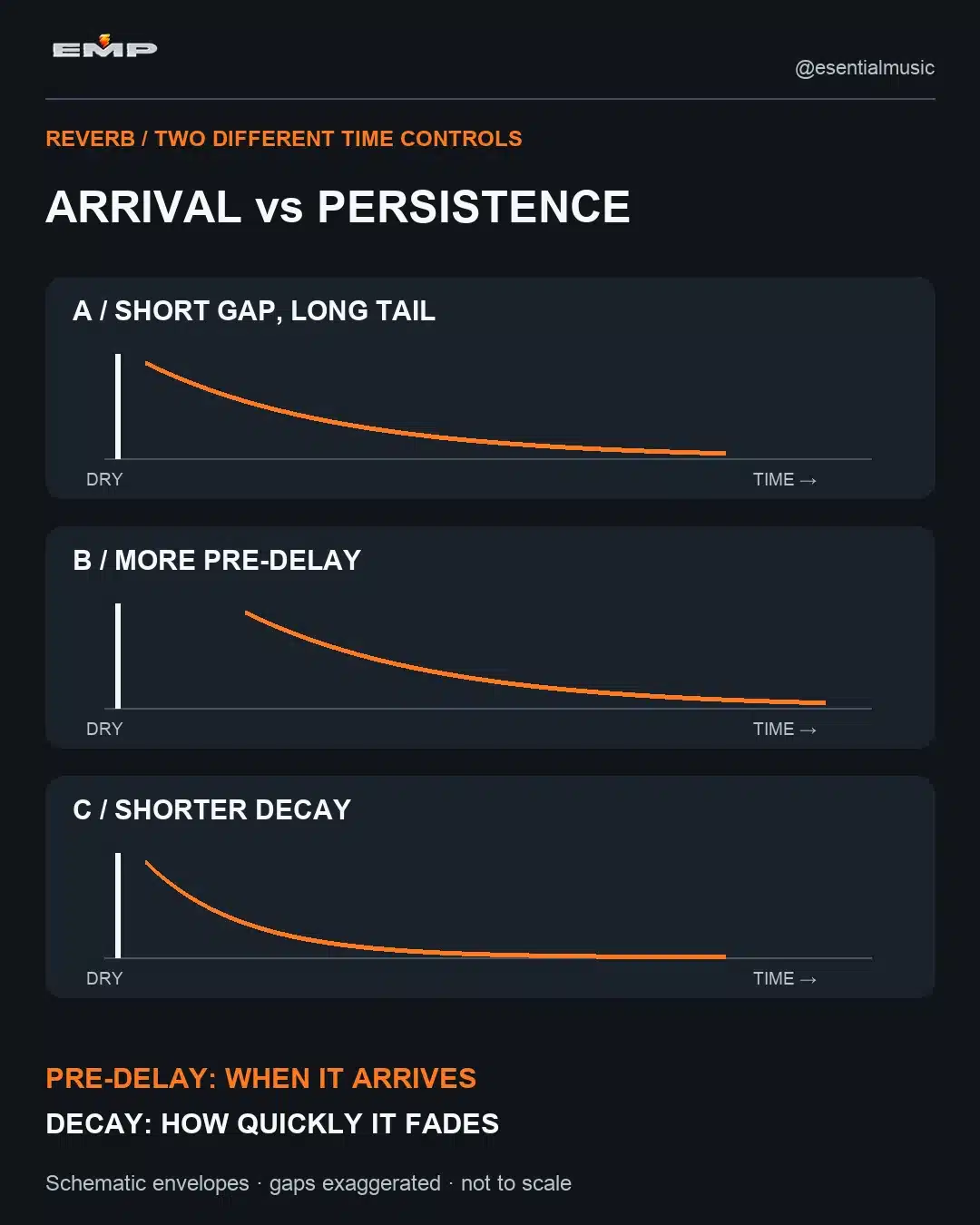
Pre-delay controls the gap before the reverberant response; decay controls how that response fades. Use pre-delay to explore separation around the initial sound. Use decay to manage the tail’s persistence. Neither control replaces the wet level, filtering or an arrangement with enough space.
This is a practical, plugin-independent way to choose between those controls. You can follow it using your existing reverb. The diagrams explain timing relationships; they are not screenshots of a particular product or measurements of a real room.
What does pre-delay actually change?
Pre-delay postpones the reverb relative to the input. With a short percussive source, that can let the dry attack speak before the wet response arrives. It does not delay the dry track when implemented as the reverb’s own pre-delay control.
FabFilter’s reverb documentation describes this as separation between the original sound and the reverb tail. Different algorithms can handle early reflections and the later tail differently, so check your reverb’s manual if the result does not match the simple model.
At longer settings, the wet arrival may become audible as a separate event. That can be a creative choice, but it is no longer merely an invisible clarity adjustment. Do not assume that more pre-delay always means a better or more realistic space.
What does decay change?
Decay describes the fading behavior of the reverberation. In many reverbs, the displayed time relates to RT60: the time for the response to fall by 60 dB, not a hard switch to absolute silence. Valhalla’s official user guide explains this convention. Algorithms and frequency-dependent decay controls can produce different audible results at the same displayed time.
Imagine two short notes followed by a rest. A longer decay fills more of that rest. It can also carry the first note underneath the second. Shortening decay may clarify the harmony, but can remove the atmosphere if the original problem was an overly loud return or an intrusive early response.
Choose the control by the symptom
| What you hear | First experiment | What to avoid |
|---|---|---|
| The attack feels buried, but the tail length works | Try a little more pre-delay; also compare a lower wet level | Shortening every tail automatically |
| Old notes linger into the next phrase | Shorten decay or automate the send/return | Adding more pre-delay and moving the problem later |
| A detached echo appears after each hit | Reduce pre-delay or examine early-reflection settings | Assuming the sound needs more compression |
| The space is muddy throughout | Check wet level, source density and low-frequency decay or filtering | Expecting either timing control to solve every masking problem |
A controlled listening workflow
1. Use a short, repeatable phrase
Choose a pluck, vocal phrase or percussion pattern containing both attacks and gaps. Loop it with the key supporting instruments. A sustained pad can hide the onset difference, making it a poor first diagnostic source.
Temporarily remove unrelated delay effects so you can identify what the reverb contributes. If you use a dedicated parallel return, set the reverb to wet-only there; retain the dry signal on its source track. An insert requires its own appropriate dry/wet balance.
2. Set an audible but sensible tail
Begin with the reverb clearly audible, not overwhelming. Adjust decay until the tail supports the musical gaps. Do not chase a preset number. A fast, sparse phrase can tolerate more space than a slower phrase with dense sustained harmony.
3. Compare pre-delay while holding other settings still
Try three settings: a near-immediate response, a modest gap, and a clearly separated arrival. Listen for the point at which the attack becomes easier to follow without the reverb sounding disconnected. Then fine-tune between those settings.
Keep the source level and return level fixed during that comparison. If you adjust decay, wet level and pre-delay simultaneously, it becomes difficult to identify what improved the mix.
4. Revisit the tail against the following note
Adding a gap shifts the reverberant response later. Now inspect the next note or section boundary: has the previous tail moved into a place you wanted to keep clean? If so, shorten it or reduce the send at that moment. Pre-delay is not free space; it redistributes when the wet energy arrives.
Should pre-delay be synchronized to tempo?
Tempo divisions give you useful reference points, not compulsory settings. The duration of a quarter note in milliseconds is 60,000 divided by BPM. Divide that duration by two for an eighth note, by four for a sixteenth, or by eight for a thirty-second.
Quarter note = 60,000 ÷ BPM
Thirty-second note = 7,500 ÷ BPM
At 120 BPM, those durations are 500 ms and 62.5 ms respectively. Eventide’s reverb parameter guide presents 7,500 ÷ BPM as a pre-delay reference. That is specifically a thirty-second-note duration, not a universal formula for the “correct” reverb setting.
| Tempo | 1/32 note | 1/64 note |
|---|---|---|
| 100 BPM | 75 ms | 37.5 ms |
| 120 BPM | 62.5 ms | 31.25 ms |
| 128 BPM | 58.59 ms | 29.30 ms |
A synchronized value can create a pleasing rhythmic relationship. An unsynchronized value may preserve the attack more naturally. Try both, especially if a long pre-delay sounds like a slap after every consonant or snare. Use the table to understand the timing, not to override what the phrase needs.
Why the tail does not have to end exactly on a beat
A decay time is not usually a gate duration. The response fades rather than stopping at a precise boundary, and its audibility depends on the music around it. Subtracting pre-delay from a bar length can be a rough experiment, but it does not prove that the reverb will be inaudible by the next bar.
If a transition needs a definite stop, use deliberate return-level automation or another appropriate level-control method. Do not assume a tempo calculator has guaranteed silence.
Three small experiments worth saving
Clear pluck: keep the existing decay, compare 0, 20 and 40 ms of pre-delay, and choose the clearest attack in context. These are test points, not recommended final settings.
Busy chord phrase: hold pre-delay steady and reduce decay until the old harmony stops obscuring the new one. If clarity returns but the space becomes too small, try a quieter longer tail instead.
Sparse breakdown: allow more tail between notes, then reduce the send before the next dense section. The arrangement can carry a large space at one moment and need restraint at the next.
Know when the problem is elsewhere
Pre-delay will not untangle several full-range synth layers that all play the same voicing. Use the synth-layering diagnostic when the dry arrangement already lacks separation. For general balance and routing decisions, start with EMP’s electronic music mixing overview.
Also check whether the source already contains a printed reverb or a long instrument release. A second reverb cannot remove the space baked into a sample. Compare the dry source, the new wet return and their combination so that you are correcting the right layer.
The useful distinction: arrival versus persistence
Pre-delay asks, “When should the space arrive?” Decay asks, “How long should it linger?” Make those decisions separately, then judge their interaction with wet level, tone and the next musical event.
Your next step: save two level-consistent versions of the same phrase: one changing only pre-delay, the other changing only decay. Keep the version that makes the musical line easier to follow while preserving the space you actually want.