EMP / Performance & MIDI
A piano part can contain all the right notes and still feel as if nobody is playing it. The fix is not to make every note slightly wrong. It is to decide which notes lead, which support, and where the phrase needs to breathe.
To humanize MIDI piano, shape velocity around a musical phrase, separate melody from accompaniment, adjust selected note starts, and edit note endings and sustain deliberately. Keep important rhythmic anchors stable. Randomization can add finishing detail, but it should not choose the interpretation for you.
This is a DAW-neutral editing workflow for a piano part you already have. You can draw the notes yourself or work with an editable MIDI file; recording a new performance is optional. The examples below are original teaching examples, not transcriptions of a commercial song.
First, check what your piano does with velocity
Play the same note softly, moderately and firmly, or draw three repeated notes with different velocities. Does the instrument become brighter as well as louder? Does one velocity cross into an unusually sharp sample? You need to understand that response before editing an entire passage.
Velocity is not simply a track-volume control. Depending on the instrument, it can influence level, sample selection and tone. A sound with little velocity response may not reveal much of your editing. Choose a responsive piano, reduce excessive compression, and temporarily turn down long effects so you can hear the performance clearly.
There is no universal velocity number for “gentle piano.” The same MIDI can behave differently on two instruments. Make the sound choice first, then audition your changes through that instrument.
1. Give the melody priority over the accompaniment
Identify the line you would sing if the piano were the only instrument playing. That is often the top voice, but not always. Select it separately from the bass and inner chord tones. Bring it forward enough to remain understandable at low listening volume.
Now lower the supporting notes instead of raising everything. In a chord containing a bass note, two inner voices and a melody note, all four do not need the same attack strength. A quieter accompaniment can make the phrase sound expressive without making the track louder.
Build a contour, not a velocity lottery
Choose a destination within each short phrase. Let the preceding notes lean toward it, then relax after the arrival. A four-note melody might rise in strength toward its third note and settle on the fourth. A different phrase might begin strongly and recede. The shape should follow the melody rather than a rule that every downbeat must be loud.
Native Instruments’ interview with producer UOAK also emphasizes timing and velocity as important parts of a convincing piano performance. Treat any artist’s preferred settings as examples, not requirements for your own instrument.
2. Adjust timing around stable anchors
Listen with the drums or a simple pulse. Decide which attacks define the groove: perhaps the bass on beat one and the melody’s main arrival. Leave those in place while editing less important notes around them.
Try a small delay on an inner chord tone, or let one pickup lead into the next beat. Undo the move if it weakens the phrase. Humanization does not require changing every note, and a tightly quantized house piano can be exactly right for the arrangement.
Separate a chord spread from a late chord
Moving an entire chord later changes its placement against the beat. Separating the note starts within the chord changes the gesture. These are different choices. For a gentle rolled arrival, keep the lowest note near the anchor and let the remaining notes follow over a short interval. For a firm rhythmic stab, a compact attack may work better.
Do not roll every chord from bottom to top. Repeating the same spread on every attack becomes another mechanical signature. Some chords should remain almost simultaneous; some may lead with the melody. Judge the result at normal tempo, not only while zoomed into the note editor.
3. Edit note endings before reaching for more reverb
A note’s end helps define phrasing. If every note finishes at the same grid boundary, the part may feel clipped. If every note overlaps the next, chord changes can blur. Listen to the transition between two chords rather than judging each chord in isolation.
Shorten accompaniment notes before a new harmony when the old notes create a clash. Allow a melody note to connect into the next phrase only when the connection is intentional. Check repeated notes especially carefully: overlapping copies of the same pitch can respond differently across instruments.
Use sustain as a separate performance decision
For standard MIDI 1.0 sustain switching, the MIDI Association assigns controller 64 to the damper pedal: values 0–63 are off and 64–127 are on. Some piano instruments support more detailed pedal behavior; check their documentation rather than assuming every instrument reacts identically.
Begin with the pedal off so that note-length problems are exposed. Then draw a short pedal passage, release it near a harmony change, and listen for unwanted carryover. If you want a connected transition, experiment with re-pedaling just after the new chord starts. Do not hold sustain down across the whole arrangement simply to make it sound bigger.
A practical four-note editing example
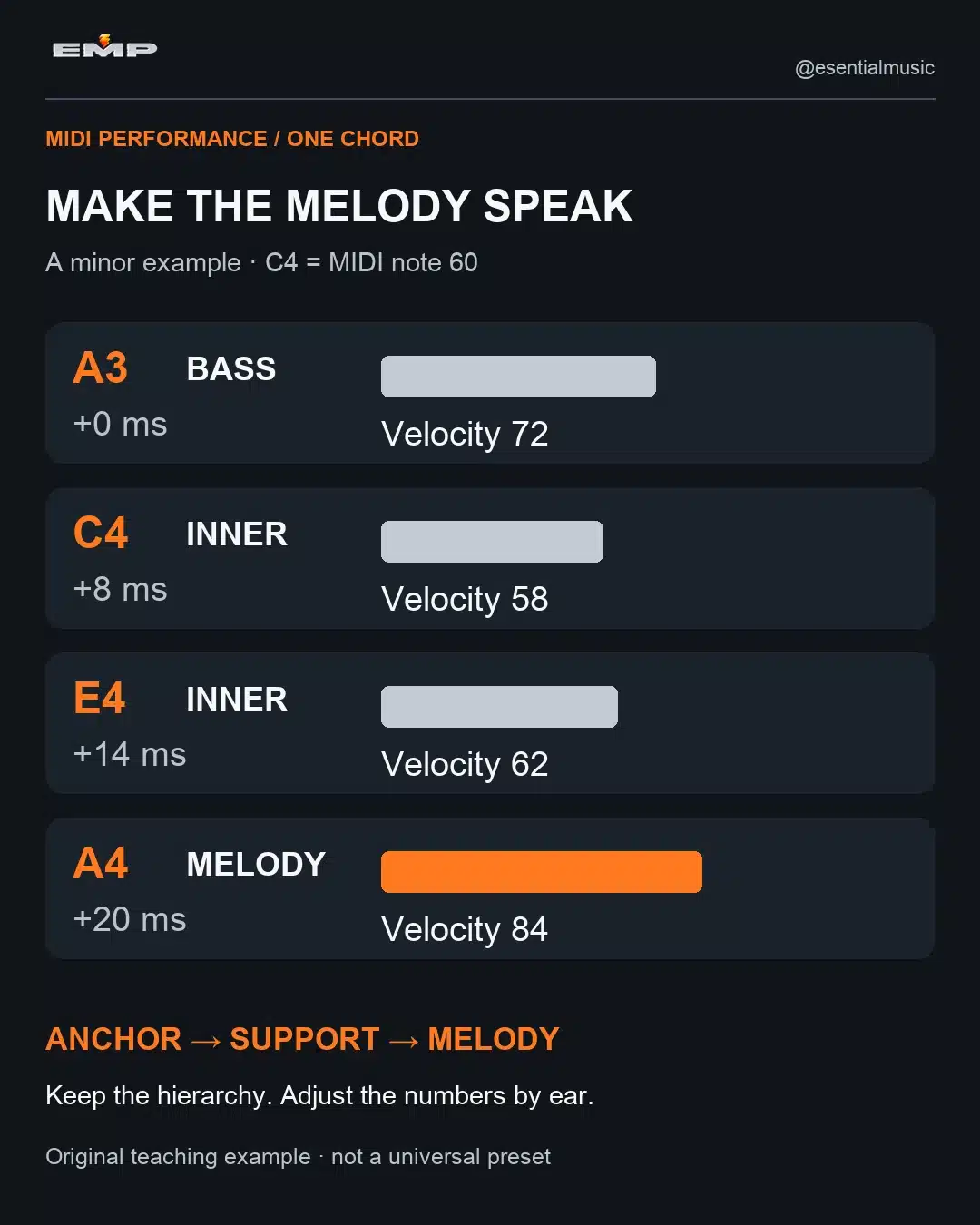
At 100 BPM, draw A3, C4, E4 and A4 together on beat one. Here, C4 means middle C, MIDI note 60; octave labels differ between applications. Use one responsive piano, no sustain pedal and an initial velocity of 80 for all four notes.
| Note / role | First edit | Listen for |
|---|---|---|
| A3 / bass | Velocity 72; on the beat | A clear, steady harmonic anchor |
| C4 / inner voice | Velocity 58; 8 ms later | Support without a hard competing attack |
| E4 / inner voice | Velocity 62; 14 ms later | A small spread, not an obvious arpeggio |
| A4 / melody | Velocity 84; 20 ms later | The upper line speaking clearly |
These are starting values for an experiment. First compare velocity edits alone. Then add the timing offsets. If the melody now feels late, move A4 back toward the beat while retaining the softer inner voices. Keep the improvement, not the numbers.
Repeat the chord later in the phrase and change its dynamic direction rather than generating four new random values. Finally, introduce a different chord and edit the old notes’ endings so that the transition stays clear.
4. Add small variation only after the phrase works
Make a duplicate of the edited region. If repeated accompaniment notes still feel identical, try a narrow amount of velocity or timing variation on those notes only. Keep the main melody and anchor notes out of that first pass.
Listen over several repetitions. A variation tool can occasionally make a supporting note louder than the melody or pull a note into the wrong rhythmic pocket. Correct those events instead of accepting the entire result because it is labelled “humanize.” Also check whether the piano already adds timing or dynamic variation internally.
When comparing versions, keep their perceived level reasonably similar. A stronger average velocity can make one version seem more exciting simply because it is louder or brighter. You are evaluating phrasing, not choosing the loudest file.
What if the piano still sounds unnatural?
- The part feels busy: remove unnecessary notes and reconsider the reach between bass and melody. Randomness cannot make an implausibly dense part feel like a restrained performance.
- One note keeps jumping out: inspect its velocity and the instrument’s dynamic response before compressing the whole track.
- The harmony smears: check note overlap and pedal data before adding EQ.
- The groove drifts: restore the structural anchors and reduce timing variation.
- The tone is repetitive: the sample instrument may have limited dynamic or repeated-note variation. MIDI editing cannot create recordings the instrument does not contain.
If the difficulty is getting the notes into the DAW in the first place, use the separate FL Studio MIDI import guide. If you need harmony rather than performance editing, the trance chord progression guide addresses chord choices and voicings. Those are different decisions from how the finished notes are played.
Finish with a musical test
Play the whole phrase quietly, with the rest of the track. Can you follow the melody? Does the bass still connect to the pulse? Do chord changes remain clear without losing warmth? If yes, stop. The aim is an intentional performance, not visible irregularity in every lane.
Your next step: take one four-bar piano phrase and make three passes—voice balance, timing, then endings and sustain. Save the original so that you can hear exactly what each pass contributed.